
How do I add Lesson types and Pricing?
Updated
TeachMe.To gives coaches full control over their lesson offerings, pricing, and group size. You can edit your rates, adjust lesson types, and set your maximum number of students directly from the TeachMe.To Coach App.
Below is a step-by-step guide to updating everything:
1. How to Adjust Your Lesson Pricing
Step-by-Step
- Open the TeachMe.To Coach App
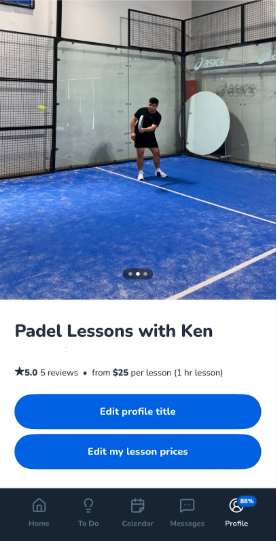
- Tap Profile in the bottom navigation
- Select Preview Profile
- Tap Edit My Lesson Prices
This is where you set or update your pricing for:
- Private lessons
- Group lessons
- Multi-student sessions
- Different lesson durations (if applicable)
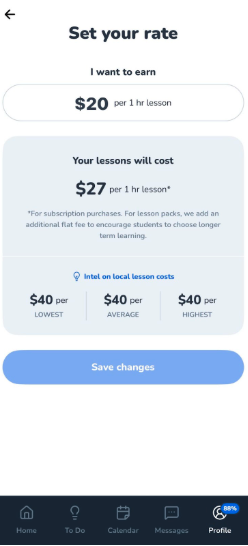
Use the Built-In Pricing Calculator
When adjusting your rates, you’ll see a built-in calculator designed to help you choose competitive and fair pricing.
Here’s how it works:
- Enter the amount you want to earn per lesson
- The app automatically calculates the final lesson price the Student will see
- You can adjust the number until you find the ideal combination of income and competitiveness in your local market
This tool helps you:
- Understand your take-home earnings
- Stay aligned with pricing norms in your skill and ZIP code
- Maximize Student conversions while still valuing your time
2. How to Set Your Lesson Types and Group Size
Your lesson types include:
- Private 1-on-1 sessions
- Two-person lessons
- Small groups
- Custom group sizes depending on the activity
To update these settings:
Step-by-Step
- Open the Coach App
- Tap Profile
- Select Preview Profile
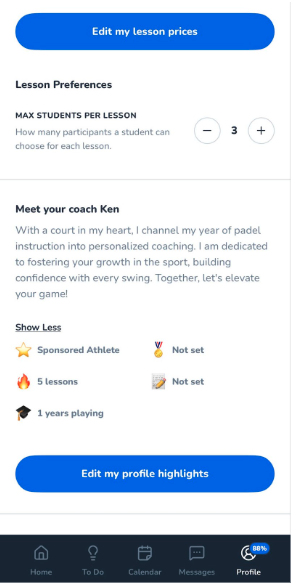
- Scroll down past Edit My Lesson Prices
- Find the section for Maximum Students Per Lesson
Here you can choose:
- The maximum number of Students you’re comfortable teaching
- Whether you want to offer only private lessons or include group sessions
- Group sizes that match your teaching style, facility space, and sport requirements
For example:
- Tennis and pickleball often allow 1 to 4 Students
- Golf may vary based on range space
- Fitness coaches may allow larger groups
Why Updating Pricing and Lesson Types Matters
Keeping your pricing and lesson types up to date helps you:
- Stay competitive in your local market
- Attract more Students searching for group or private options
- Clarify what you offer without back-and-forth messaging
- Maximize your earning potential
A clear, well-structured profile converts significantly more bookings.
To Adjust Lesson Prices in the App:
Still need help? Our customer support team is always here to help. Contact us.